Interactive Minecraft Astro Pi
I have created what I think is a fun way to explore your new Astro Pi - its an interactive Astro Pi in Minecraft.
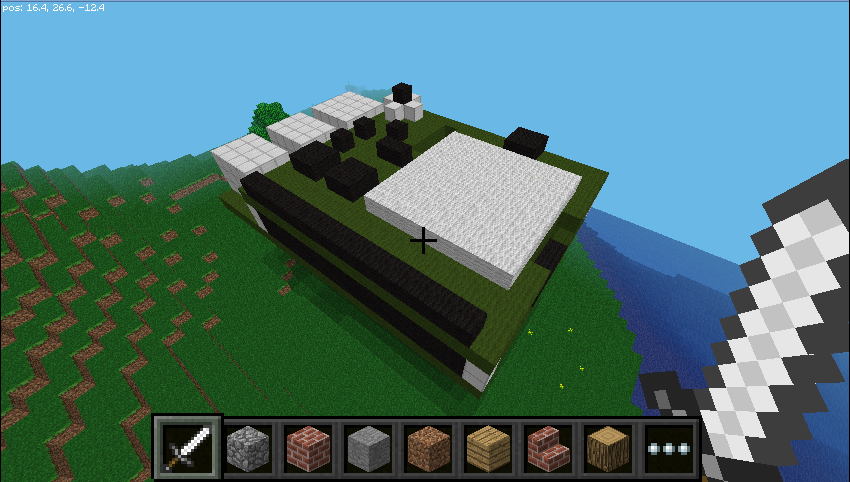
All of the components on the board are ‘hitable’ so when you right click them while holding a sword, it will tell you about that component is or make it work e.g. if you hit the humidity sensor it will tell you the humidity value at that time, or if you hit the led matrix it will light that led on the board.
If you have got an Astro Pi board and haven’t yet set it up take a look at my Astro Pi - Getting Started Tutorial.
Once your Astro Pi is up and running you can download the code from github.com/martinohanlon/MinecraftInteractiveAstroPi and run it by opening a terminal and using the following commands:
cd ~
git clone https://github.com/martinohanlon/MinecraftInteractiveAstroPi.git
cd MinecraftInteractiveAstroPi
sudo python mcinteractiveastropi.py
The Minecraft Astro Pi board will appear above the player, so fly up (double tap space) and have a look around. You interact with it by hitting it (right clicking) with a sword.
Someone let me know that they got an error while trying to use the program with Python 2 because AstroPi needs a module called PIL which wasn’t installed. I didn’t get this error but if you received the error “No module named PIL”, run the following command to install it:
sudo pip install Pillow