Pygame Zero - Pong
I wanted to explore Pygame Zero so I gave myself a challenge of creating a version of Pong.
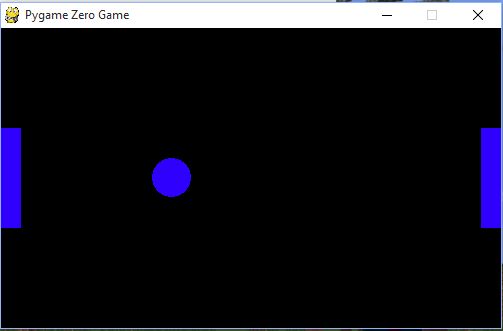
My first piece of learning from the experience just reconfirms something I already knew - games development is hard! Pygame Zero takes some of the pain and is certainly a lot easier to get started with than Pygame, but there is still a lot of work to do for game like Pong.
The second thing I learnt is that I didn’t know how Pong worked! This page which describes how the balls reacts when it hits a paddle is really useful.
You will find all the code on github https://github.com/martinohanlon/pgzero-pong.
You control the paddles with Q A (player 1) and K M (player 2).
Its very much unfinished and is missing features like:
- Time limit - the game continues forever
- Scores - the score should be displayed on the screen
- 1 player mode - artificial intelligent 2nd player
Does anyone fancy picking it up?
Code
from math import sin, cos, radians
from time import sleep

#setup the constants
WIDTH = 500
HEIGHT = 300
BALLSPEED = 10
PADDLESPEED = 5
MAXBOUNCEANGLE = 75

def reset_game(angle):

    #setup ball properties
    ball.pos = WIDTH / 2, HEIGHT / 2
    ball.x_float = float(ball.x)
    ball.y_float = float(ball.y)
    ball.angle = angle
    ball.x_vel = BALLSPEED * cos(radians(ball.angle))
    ball.y_vel = BALLSPEED * sin(radians(ball.angle))

    #position the paddles
    pad1.pos = 10, HEIGHT / 2
    pad2.pos = WIDTH - 10, HEIGHT / 2

#create a rectangle of the playing area
screenRect = Rect(10,0,WIDTH - 10,HEIGHT)

#create ball
ball = Actor('ball')

#create paddles
pad1 = Actor('paddle')
pad2 = Actor('paddle')

#reset the game
reset_game(180)

#setup the goals
goals = [0, 0]

def draw():
    screen.clear()
    ball.draw()
    pad1.draw()
    pad2.draw()

def update():

    #move the paddles
    if keyboard.q:
        pad1.top -= PADDLESPEED
    if keyboard.a:
        pad1.top += PADDLESPEED
    if keyboard.k:
        pad2.top -= PADDLESPEED
    if keyboard.m:
        pad2.top += PADDLESPEED

    #move the ball
    ball_old_x = ball.x_float
    ball_old_y = ball.y_float

    ball.x_float = ball.x_float + ball.x_vel
    ball.y_float = ball.y_float + ball.y_vel
    ball.x = int(round(ball.x_float))
    ball.y = int(round(ball.y_float))

    #move the ball back to where it was?
    reset_ball = False

    #has the ball left the screen?
    if not screenRect.contains(ball):

        #did it hit the top or bottom?
        if ball.top < 0 or ball.bottom > HEIGHT:
            ball.y_vel *= -1
            reset_ball = True

        #it must have hit the side
        else:
            if ball.left < 10:
                print("Player 2 goal")
                goals[1] += 1
                reset_game(180)
                sleep(2)
                print("Score {} : {}".format(goals[0], goals[1]))

            elif ball.right > WIDTH - 10:
                print("player 1 goal")
                goals[1] += 1
                reset_game(0)
                sleep(2)
                print("Score {} : {}".format(goals[0], goals[1]))

    #has the ball hit a paddle
    if pad1.colliderect(ball):
        #work out the bounce angle
        bounce_angle = ((ball.y - pad1.y) / (pad1.height / 2)) * MAXBOUNCEANGLE
        ball.angle = max(0 - MAXBOUNCEANGLE, min(MAXBOUNCEANGLE, bounce_angle))
        #work out the ball velocity
        ball.x_vel = BALLSPEED * cos(radians(ball.angle))
        ball.y_vel = BALLSPEED * sin(radians(ball.angle))

        reset_ball = True

    elif pad2.colliderect(ball):
        bounce_angle = 180 - (((ball.y - pad2.y) / (pad2.height / 2)) * MAXBOUNCEANGLE)
        ball.angle = max(180 - MAXBOUNCEANGLE, min(180 + MAXBOUNCEANGLE, bounce_angle))
        ball.x_vel = BALLSPEED * cos(radians(ball.angle))
        ball.y_vel = BALLSPEED * sin(radians(ball.angle))

        reset_ball = True

    if reset_ball:
        ball.x_float = ball_old_x
        ball.y_float = ball_old_y
        ball.x = int(round(ball.x_float))
        ball.y = int(round(ball.y_float))