Raspberry Pi - BBC iPlayer Personal Podcast
Anyway… I like radio, love it, I like music and I love radio comedies, particularly those on BBC Radio 4, but, I never get to hear them, I’m just not around at the right time and when I do have time to listen (in the car, on the train, etc) they aren’t on and streaming them is a right pain.
So along came the Raspberry Pi and I thought maybe here is an opportunity for me to have an always on, low power device, which could download stuff from BBC iPlayer, using the open source project get_iplayer (see my post about how to install get_iplayer on the Pi), then I could put it on my phone / ipod and listen to it when I do have time.
Then I thought how about making my own personal custom podcast of the things I have downloaded from iPlayer, then I can subscribe to it and hey presto, all that stuff I wanted to listen too, but never got the time will automatically end up on my phone! Not only brilliant for listening to radio, but it would also work for TV shows as well!
This is how I did it:
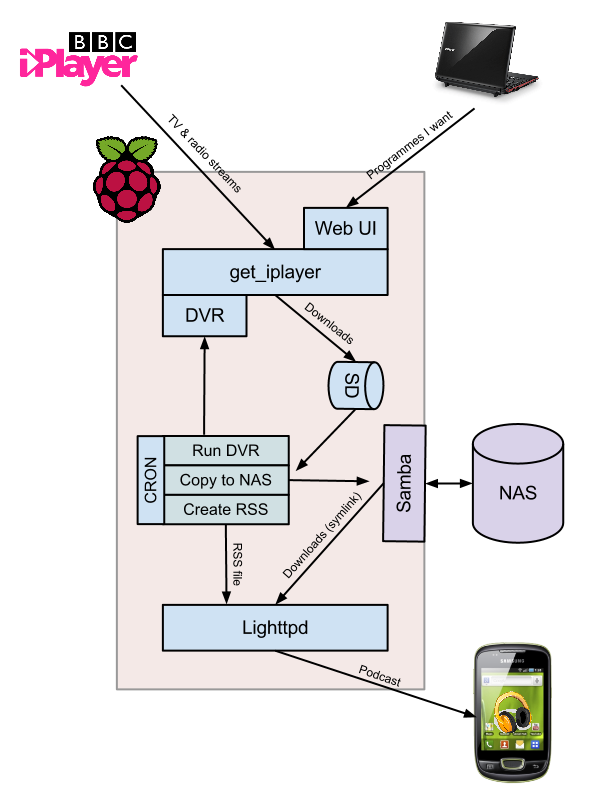
I used the DVR capabilities of get_iplayer to download TV & Radio streams from BBC iPlayer, I also set up the WebUI component which allowed me to tell get_iplayer to download specific programmes or a complete series as and when a new episode becomes available from the comfort of my laptop.
Every hour a scheduled job (CRON) runs a series of commands:
- The DVR function in get_iplayer in called which downloads and encodes any new programmes which have become available since it last ran. See post re get_iplayer setup.
- A script then moves the programmes from the SD onto my NAS drive using Samba. See post re connecting to a NAS.
- A small python program, get_iplayer_genrss, then runs which uses the get_iplayer download history to write out a RSS file which contains the latest programmes which have been downloaded. See here for installation and usage.
Lighttpd (lighty) is then used to provide http access to the RSS file and the programmes via a symbolic link to the NAS drive.
I can then subscribe to the RSS using a podcast app (I use google listen), it will then download the new programmes allowing me to use them at my leisure.
I am SO impressive with this, not with me for putting it together, but because I have achieved this using a £25 peice of hardware, some free readily available software and 1 small python program. This for me shows the power of the Raspberry Pi, not its computational power, but the inspirational it can bring to people to try a create something.