Raspberry Pi - GPIO Game - How many times can you press it?
Anyway, I decided to see if I could make a game with the GPIO and learn a bit more about the GPIO and how to use it.
The concept is really simple, how many times can you press a button in 2 seconds? My current record is 20.
The game counts you in, 5 leds lit, 4, 3, 2, 1 then you press it as many times are you can, it counts up in binary on 5 leds, before showing your high score in binary.
I used 5 leds and one button, connected to the Pi in the following configuration.
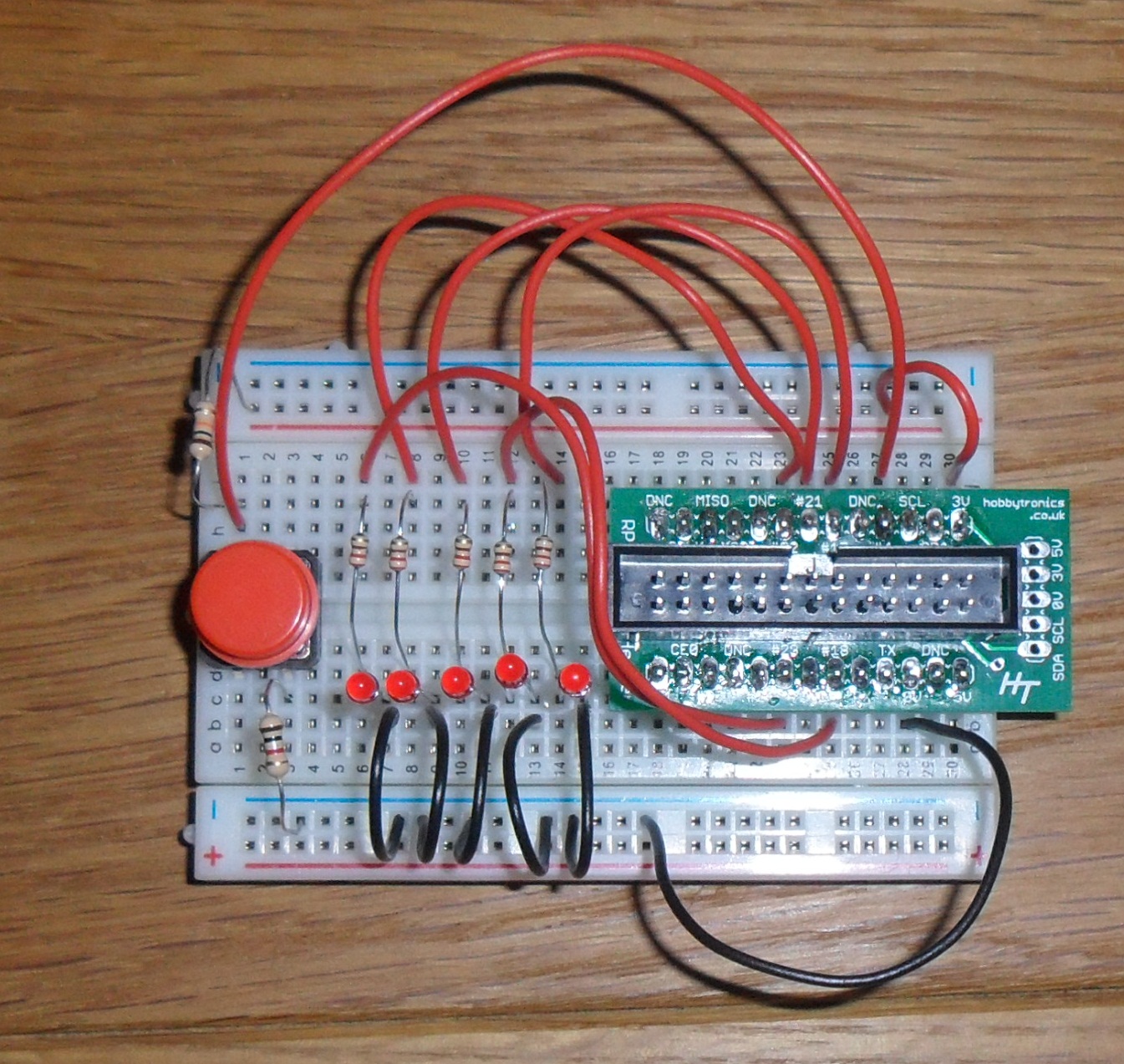
Gnd -> 10k resistor (pull down) -> Button -> GPIO 4 -> 1k resistor (protection) -> 3v
GPIO 17 -> Resistor -> LED -> Gnd GPIO 18 -> Resistor -> LED -> Gnd GPIO 21 -> Resistor -> LED -> Gnd GPIO 22 -> Resistor -> LED -> Gnd GPIO 23 -> Resistor -> LED -> Gnd
The leds are configured in a binary sequence going:
I then wrote the following python program:
nano superpress.py
import RPi.GPIO as GPIO
import time

# led gpio pins
ledGPIOPins = [17,18,21,22,23]
# button gpio pin
buttonPin = 4
# button pressed state
buttonPressedState = False
# lenght of game in seconds
gameTime = 2

# animations, [[value to display, delay][repeat]]
countToTenAnim = [[1,1],[2,1],[3,1],[4,1],[5,1],[6,1],[7,1],[8,1],[10,1]]
outInAndBackAnim = [[17,1],[10,0.5],[4,0.25],[0,0.1],[4,0.25],[10,0.5],[17,1]]
upAndDownAnim = [[1,0.2],[3,0.2],[7,0.2],[15,0.2],[31,0.2],[15,0.2],[7,0.2],[3,0.2],[1,0.2],[0,0.2]]
countDownAnim = [[31,0.2],[15,0.2],[7,0.2],[3,0.2],[1,0.2],[0,0]]
allFlash = [[31,0.5],[0,0.2],[31,0.5],[0,0.2],[31,0.5],[0,0.2]]

def setupGPIO():
    # set gpio mode to use BCM pin numbers
    GPIO.setmode(GPIO.BCM)
    # loop through GPIO pins and set to output
    for ledGPIOPin in ledGPIOPins:
        # setup gpio pin as output
        GPIO.setup(ledGPIOPin, GPIO.OUT)

def setLeds(ledGPIOValues):
    ledGPIOPin = 0
    # loop through led values, setting to appropriate GPIO pin
    for ledGPIOValue in ledGPIOValues:
        GPIO.output(ledGPIOPins[ledGPIOPin], ledGPIOValue)
        ledGPIOPin = ledGPIOPin + 1

def display(number):
    binary = ""
    # reset led values
    ledGPIOValues = [False, False, False, False, False]
    # if number is greater than 5 bit, set it to the maximum
    if number > 31 : number = 31

    # calculate binary as a list of True & False
    remainingValue = number
    digit = 0
    while remainingValue > 0:
        if remainingValue % 2 == 1:
            ledGPIOValues[digit] = True
            binary = "1" + binary
            remainingValue = remainingValue - 1
        else:
            ledGPIOValues[digit] = False
            binary = "0" + binary
        remainingValue = remainingValue / 2
        digit = digit + 1

    #output value to leds
    setLeds(ledGPIOValues)

def displayAnimation(animation):
    for frame in animation:
        display(frame[0])
        time.sleep(frame[1])

#class to control button
class Button:
    # initialise button
    def __init__(self, gpioPin, pressedState):
        self.gpioPin = gpioPin
        self.pressedState = pressedState
        # setup button gpio pin as input
        GPIO.setup(self.gpioPin, GPIO.IN)
        # get initial button value
        self.lastButtonValue = GPIO.input(self.gpioPin)
    # read value from button
    def readValue(self):
        return GPIO.input(self.gpioPin)

    # monitor the button, return true if button has been pressed since last run
    def monitorPressed(self):
        buttonPressed = False
        # read gpio input
        currentButtonValue = GPIO.input(self.gpioPin)
        # has value changed (i.e. pressed or unpressed)
        if currentButtonValue != self.lastButtonValue:
            # was the button pressed
            if currentButtonValue == self.pressedState:
                buttonPressed = True
            self.lastButtonValue = currentButtonValue
        return buttonPressed

#main program
try:
    setupGPIO()
    # create button class
    button = Button(buttonPin, buttonPressedState)
    # set leds to off
    display (0)
    while True:
        # press button to start game
        if button.monitorPressed() == True:
            print "game intro"
            displayAnimation(countDownAnim)
            print "game started"
            buttonCount = 0
            display(buttonCount)
            timeStarted = time.time()
            while (time.time() - timeStarted) < gameTime:
                if button.monitorPressed() == True:
                    buttonCount = buttonCount + 1
                    display(buttonCount)
            print "game finished"
            displayAnimation(allFlash)
            print "show score"
            display(buttonCount)
            # wait
            time.sleep(0.01)

except KeyboardInterrupt:
    # cleanup GPIO
    GPIO.cleanup()
Run the game
sudo python superpress.py
Press the button like a maniac… If you beat 20, leave me a comment, but I want proof!