Raspberry Pi - GPS Setup and Python
I got myself one of adafruit’s ultimate GPS breakout boards as I want to experiment with capturing GPS data in my car projects. Its a seriously good bit of kit and if you looking for a GPS module you could do a lot worse than this. They also have an excellent tutorial on setting it up with the raspberry pi, http://learn.adafruit.com/adafruit-ultimate-gps-on-the-raspberry-pi.
If your in the UK, I noticed that they had them on amazon and pimoroni.
I used the raspberry pi’s on board UART to connect to the GPS module, Adafruit advocate using a USB to serial device but that didn’t suit my needs (I need the USB for other things).
I also create a GPSController class in python to allow me to communicate with the module easily.
Connecting the GPS module Wiring it up is pretty simple:
- Raspberry Pi - 5v -> GPS Module - VIN
- Raspberry Pi - GND -> GPS Module - GND
- Raspberry Pi - Tx -> GPS Module - Rx
- Raspberry Pi - Rx -> GPS Module - Tx
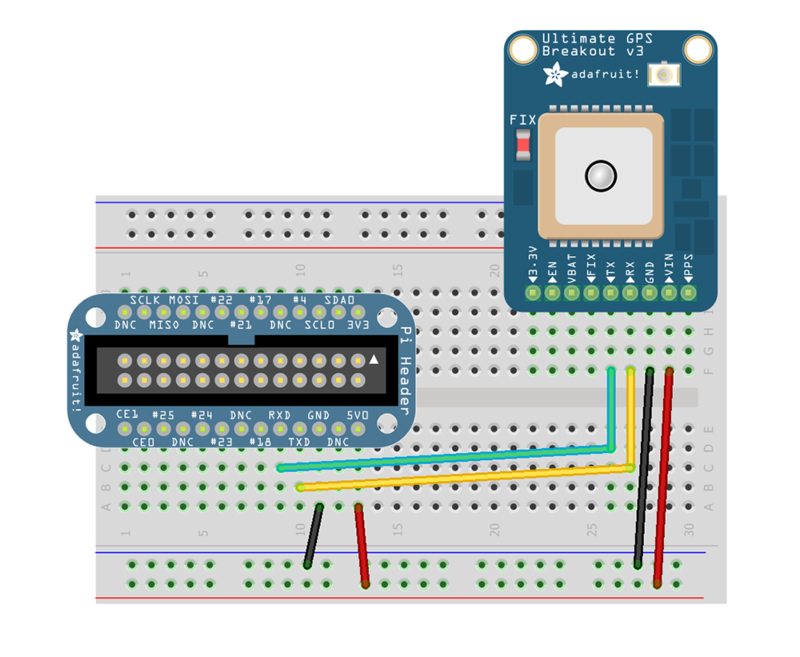
Enable the UART
By default the UART is enabled to allow you to connect a terminal window and login, I needed to disable this to free it up for the GPS Module.
Edit the boot options to change the UART so it doesnt provide a terminal connection by default:
sudo nano /boot/cmdline.txt
The contents looks like this (yours might be slightly different depending on your distribution):
dwc_otg.lpm_enable=0 console=ttyAMA0,115200 kgdboc=ttyAMA0,115200 console=tty1 root=/dev/mmcblk0p2 rootfstype=ext4 elevator=deadline rootwait
remove the following config from the file and save it.
console=ttyAMA0,115200
kgdboc=ttyAMA0,115200
Change inittab so it doesnt spawn a login to the serial connection:
sudo nano /etc/inittab
Change:
#Spawn a getty on Raspberry Pi serial line
T0:23:respawn:/sbin/getty -L ttyAMA0 115200 vt100
to:
#Spawn a getty on Raspberry Pi serial line
#T0:23:respawn:/sbin/getty -L ttyAMA0 115200 vt100
Reboot
sudo shutdown -r now
Install GPSD GPSD is an open source project which provides a daemon which streams GPS data via a TCP socket, allowing you to communicate with a whole host of different GPS devices (not just this one):
sudo apt-get install gpsd gpsd-clients python-gps
Run gpsd GPSD needs to be started up, using the following command:
sudo gpsd /dev/ttyAMA0 -F /var/run/gpsd.sock
Test gpsd There is a simple GPS client which you can run to test everything is working:
cgps -s
It may take a few seconds for data to come through, but you should see a screen like this:
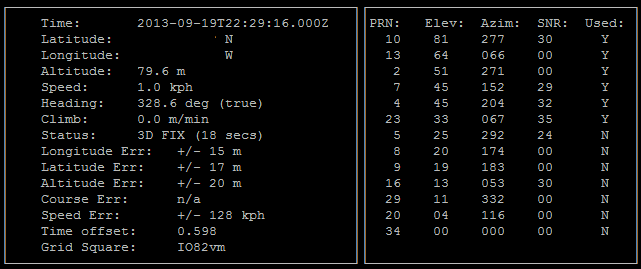
Python code In order to control and capture the GPS data in python I started looking round for some code, this took me to http://www.danmandle.com/blog/getting-gpsd-to-work-with-python which I used as a starting point for creating this python GPSController class. It uses threading to continuously read the stream of data from GPSD and present it as properties of the class.
There is a more in depth example of how to use the class in the code below, but in simple terms you use it like this:
#create controller
gpsc = GpsController()

#start controller
gpsc.start()

#read latitude and longitude
print gpsc.fix.latitude
print gpsc.fix.longitude

#stop controller
gpsc.stopController()
Note - you may have to wait a few seconds for the data to start streaming
GPSController.py
from gps import *
import time
import threading
import math

class GpsController(threading.Thread):
    def __init__(self):
        threading.Thread.__init__(self)
        self.gpsd = gps(mode=WATCH_ENABLE) #starting the stream of info
        self.running = False

    def run(self):
        self.running = True
        while self.running:
            # grab EACH set of gpsd info to clear the buffer
            self.gpsd.next()

    def stopController(self):
        self.running = False

    @property
    def fix(self):
        return self.gpsd.fix

    @property
    def utc(self):
        return self.gpsd.utc

    @property
    def satellites(self):
        return self.gpsd.satellites

if __name__ == '__main__':
    # create the controller
    gpsc = GpsController()
    try:
        # start controller
        gpsc.start()
        while True:
            print "latitude ", gpsc.fix.latitude
            print "longitude ", gpsc.fix.longitude
            print "time utc ", gpsc.utc, " + ", gpsc.fix.time
            print "altitude (m)", gpsc.fix.altitude
            print "eps ", gpsc.fix.eps
            print "epx ", gpsc.fix.epx
            print "epv ", gpsc.fix.epv
            print "ept ", gpsc.gpsd.fix.ept
            print "speed (m/s) ", gpsc.fix.speed
            print "climb ", gpsc.fix.climb
            print "track ", gpsc.fix.track
            print "mode ", gpsc.fix.mode
            print "sats ", gpsc.satellites
            time.sleep(0.5)

    #Error
    except:
        print "Unexpected error:", sys.exc_info()[0]
        raise

    #Ctrl C
    except KeyboardInterrupt:
        print "User cancelled"

    finally:
        print "Stopping gps controller"
        gpsc.stopController()
        #wait for the tread to finish
        gpsc.join()

    print "Done"