Raspberry Pi - Minecraft - Analogue Clock
I saw a couple of posts on the raspberry pi forum by a guy called SleepyOz who had created both digital and analogue clocks in Minecraft, the digital clock looks particularly good and this gave me the inspiration to create my own analogue clock.
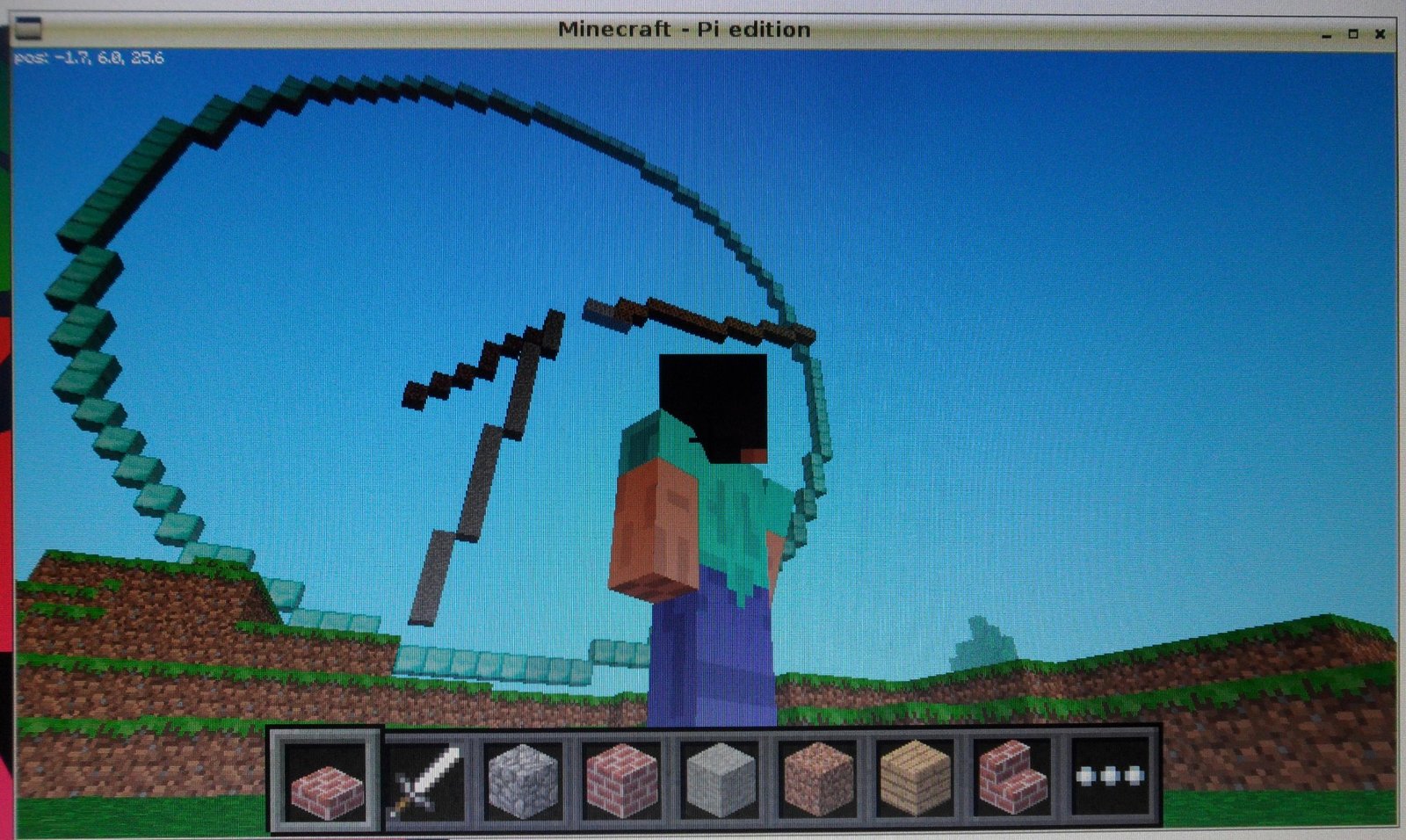
I wanted mine to be massive, big enough so you could walk on the arms as they went round and I was also keen that it use the Mojang supplied api, so I could create some re-usable functions which would no doubt be useful in the future such as:
- DrawCircle
- DrawLine
- FindPointOnCircle
The code is pretty simple, its draws a great big circle, then using trigonometry it finds where a hand (or line) needs to be drawn, by calculating what angle a clock hand would point too and finding that point on the circle before drawing a line from the centre of the clock to that point.
The time is then updated by clearing the previous hand by drawing the previous line again but setting the blocks to air, and then recreating the new hand.
If you want know more about the minecraft api and a rather gentler introduction, check out this post, Raspberry Pi - Minecraft API - the basics.
Download and run You can download the code direct from git-hub, so run minecraft, open/create a world and follow the instructions:
sudo apt-get install git-core
cd ~
git clone https://github.com/martinohanlon/minecraft-clock.git
cd minecraft-clock
python minecraft-clock.py
Code If you want to have a go yourself, try the following:
Create a directory for the program
mkdir ~/minecraft-clock
Copy the python api class library from minecraft to the programs directory
cp -r ~/mcpi/api/python/mcpi ~/minecraft-clock/minecraft
Create minecraft-bridge.py python program
nano ~/minecraft-bridge/minecraft-clock.py
or open Idle and save minecraft-clock.py to the minecraft-clock directory
Code Be careful cutting and pasting the code from a web browser and you can end up with odd characters in the program which will end in syntax errors.
#www.stuffaboutcode.com
#Raspberry Pi, Minecraft Analogue Clock

#import the minecraft.py module from the minecraft directory
import minecraft.minecraft as minecraft
#import minecraft block module
import minecraft.block as block
#import time, so delays can be used
import time
#import datetime, to get the time!
import datetime
#import math so we can use cos and sin
import math

#mid point circle algorithm
def drawCircle(mc, x0, y0, z, radius, blockType):
    f = 1 - radius
    ddf_x = 1
    ddf_y = -2 * radius
    x = 0
    y = radius
    mc.setBlock(x0, y0 + radius, z, blockType)
    mc.setBlock(x0, y0 - radius, z, blockType)
    mc.setBlock(x0 + radius, y0, z, blockType)
    mc.setBlock(x0 - radius, y0, z, blockType)
    while x < y:
        if f >= 0:
            y -= 1
            ddf_y += 2
            f += ddf_y
        x += 1
        ddf_x += 2
        f += ddf_x
        mc.setBlock(x0 + x, y0 + y, z, blockType)
        mc.setBlock(x0 - x, y0 + y, z, blockType)
        mc.setBlock(x0 + x, y0 - y, z, blockType)
        mc.setBlock(x0 - x, y0 - y, z, blockType)
        mc.setBlock(x0 + y, y0 + x, z, blockType)
        mc.setBlock(x0 - y, y0 + x, z, blockType)
        mc.setBlock(x0 + y, y0 - x, z, blockType)
        mc.setBlock(x0 - y, y0 - x, z, blockType)

#Brensenham line algorithm
def drawLine(mc, x, y, z, x2, y2, blockType):
    steep = 0
    coords = []
    dx = abs(x2 - x)
    if (x2 - x) > 0: sx = 1
    else: sx = -1
    dy = abs(y2 - y)
    if (y2 - y) > 0: sy = 1
    else: sy = -1
    if dy > dx:
        steep = 1
        x,y = y,x
        dx,dy = dy,dx
        sx,sy = sy,sx
    d = (2 * dy) - dx
    for i in range(0,dx):
        if steep: mc.setBlock(y, x, z, blockType)
        else: mc.setBlock(x, y, z, blockType)
        while d >= 0:
            y = y + sy
            d = d - (2 * dx)
        x = x + sx
        d = d + (2 * dy)
    mc.setBlock(x2, y2, z, blockType)

#find point on circle
def findPointOnCircle(cx, cy, radius, angle):
    x = cx + math.sin(math.radians(angle)) * radius
    y = cy + math.cos(math.radians(angle)) * radius
    return((int(x + 0.5),int(y + 0.5)))

def getAngleForHand(positionOnClock):
    angle = 360 * (positionOnClock / 60.0)
    return angle

def drawHourHand(mc, clockCentre, hours, minutes, blockType):
    if (hours > 11): hours = hours - 12
    angle = getAngleForHand(int((hours * 5) + (minutes * (5.0/60.0))))
    hourHandEnd = findPointOnCircle(clockCentre.x, clockCentre.y, 10.0, angle)
    drawLine(mc, clockCentre.x, clockCentre.y, clockCentre.z - 1, hourHandEnd[0], hourHandEnd[1], blockType)

def drawMinuteHand(mc, clockCentre, minutes, blockType):
    angle = getAngleForHand(minutes)
    minuteHandEnd = findPointOnCircle(clockCentre.x, clockCentre.y, 18.0, angle)
    drawLine(mc, clockCentre.x, clockCentre.y, clockCentre.z, minuteHandEnd[0], minuteHandEnd[1], blockType)

def drawSecondHand(mc, clockCentre, seconds, blockType):
    angle = getAngleForHand(seconds)
    secondHandEnd = findPointOnCircle(clockCentre.x, clockCentre.y, 20.0, angle)
    drawLine(mc, clockCentre.x, clockCentre.y, clockCentre.z + 1, secondHandEnd[0], secondHandEnd[1], blockType)

#function to draw the clock
def drawClock(mc, clockCentre, radius, time):

    blockType = block.DIAMOND_BLOCK
    #draw the circle
    drawCircle(mc, clockCentre.x, clockCentre.y, clockCentre.z, radius, blockType)

    #draw hour hand
    drawHourHand(mc, clockCentre, time.hour, time.minute, block.DIRT)

    #draw minute hand
    drawMinuteHand(mc, clockCentre, time.minute, block.STONE)

    #draw second hand
    drawSecondHand(mc, clockCentre, time.second, block.WOOD_PLANKS)

#function to update the time on the clock
def updateTime(mc, clockCentre, lastTime, time):
    #draw hour and minute hand
    if (lastTime.minute != time.minute):
        #clear hour hand
        drawHourHand(mc, clockCentre, lastTime.hour, lastTime.minute, block.AIR)
        #new hour hand
        drawHourHand(mc, clockCentre, time.hour, time.minute, block.DIRT)

        #clear hand
        drawMinuteHand(mc, clockCentre, lastTime.minute, block.AIR)
        #new hand
        drawMinuteHand(mc, clockCentre, time.minute, block.STONE)

    #draw second hand
    if (lastTime.second != time.second):
        #clear hand
        drawSecondHand(mc, clockCentre, lastTime.second, block.AIR)
        #new hand
        drawSecondHand(mc, clockCentre, time.second, block.WOOD_PLANKS)

if __name__ == "__main__":

    clockCentre = minecraft.Vec3(0, 30, 0)
    radius = 20
    time.sleep(5)
    #Connect to minecraft by creating the minecraft object
    # - minecraft needs to be running and in a game
    mc = minecraft.Minecraft.create()

    #Post a message to the minecraft chat window
    mc.postToChat("Hi, Minecraft Analogue Clock, www.stuffaboutcode.com")

    time.sleep(2)

    lastTime = datetime.datetime.now()
    #draw the clock
    drawClock(mc, clockCentre, radius, lastTime)
    #loop until Ctrl C is pressed
    try:
        while True:
            nowTime = datetime.datetime.now()
            #update the time on the clock
            updateTime(mc, clockCentre, lastTime, nowTime)
            lastTime = nowTime
            time.sleep(0.5)
    except KeyboardInterrupt:
        print "stopped"
The complete code repository is also on github, https://github.com/martinohanlon/minecraft-clock.
Run
Note - minecraft must be running and you must be in a game
python ~/minecraft-clock/minecraft-clock.py
or if using Idle, click Run Module