Raspberry Pi, Xbox 360 Controller, Python
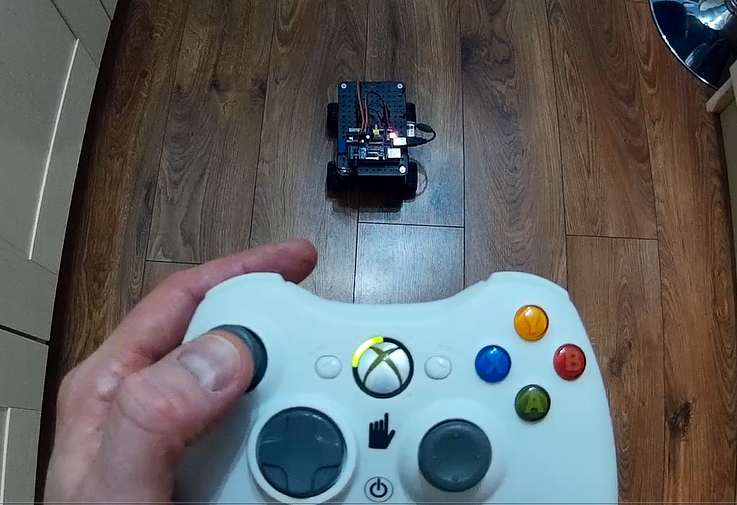 I was looking for a way of controlling my initio robot by remote and having purchased 3 xbox 360’s in the past (red ring of death :( replacements) I have got a few wireless controllers knocking about! I decided re-using one of these was the way forward.
I grabbed a £5 xbox USB wireless receiver (you can get them on Amazon UKUS) and robbed the code from zephods lego pi car project (http://blog.zephod.com/post/37120089376/lego-xbox-raspberry-pi) but I found it to be really unstable, often resulting in a ‘segmentation’ fault within a few minutes – so I decided to write my own.
Zephod’s code used the screen output of xboxdrv (a linux xbox controller driver) to create events which could be interpreted from python. I decided on a different route and (after being shown the way by Dave Honess at Pycon) used pygame to interface with xboxdrv and the controller directly.
I originally just hacked together some code to make my solution work but after asking twitter whether anyone else would find it useful I created a generic python module to allow anyone to incorporate an xbox controller into their projects.
The module works by interpreting the pygame events which xboxdrv creates when the xbox controller is used (button pressed, button released, analogue stick moved, trigger pressed, etc) and keeps track of the values of all the buttons, sticks and triggers on the controller.
These values can be read directly from the properties on the class (e.g xboxController.RTRIGGER) or the values can be passed to your program through the use of call backs i.e. when a button is pressed or a stick moved a function in your program is called and the details about what was changed and what the new value is are passed to it.
Installing and testing the module
If there is demand in the future I will wrap the module into a proper python package, but for the time being its just a separate python file (XboxController.py) which you can add to your python project.
Install xboxdrv
sudo apt-get install xboxdrv
Grab the code from GitHub (github.com/martinohanlon/XboxController) and copy the XboxController.py file to your project:
git clone https://github.com/martinohanlon/XboxController
cp XboxController/XboxContoller.py pathToYourProject
You need to run xboxdrv before you can use the module, run
sudo xboxdrv --silent &
You may get an error asking you to run xboxdrv with the option –detach-kernel-driver, if so run:
sudo xboxdrv --silent --detach-kernel-driver &
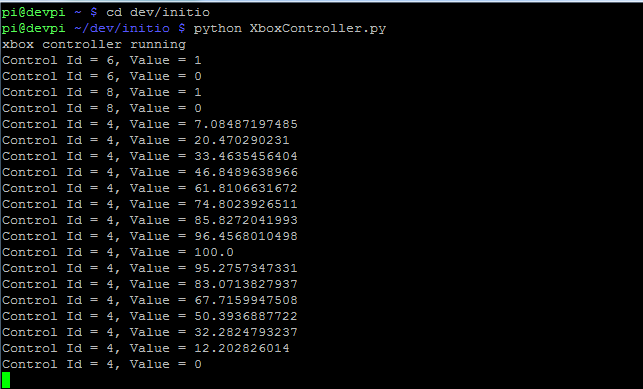
You can test the module by running the XboxController.py file
python XboxController.py
When you see the message on the screen saying the controller is running, press a button on your xbox controller.
Using the module
The module is pretty easy to use, but there are a few complex concepts to get your head around such as call backs and threading - first you need to import it into your code:
import XboxController
Then you can create an instance to the XboxController:
xboxCont = XboxController.XboxController(
    controllerCallBack = None,
    joystickNo = 0,
    deadzone = 0.1,
    scale = 1,
    invertYAxis = False)
You can adjust the behaviour of the module by passing different parameters:
- joystickNo : specify the number of the pygame joystick you want to use, usually 0
- deadzone : the minimum value which is reported from the analogue sticks, a deadzone is good to reduce sensitivity
- scale : the scale the analogue sticks will report to, so 1 will mean values are returned between -1 and 1, 0 is always the middle
- invertYAxis : the Y axis is reported as -1 being up and 1 being down, which is just weird, so this will invert it
- controllerCallBack : pass the name of a function and the xbox controller will call this function each time the controller changes (i.e. a button is pressed) returning the id of the control (what button, stick or trigger) and the current value
To add a controller call back you would use:
def myCallBack(controlId, value):
    print "Control id = {}, Value = {}".format(controlId, value)

xboxCont = XboxController.XboxController(
    controllerCallBack = myCallBack)
You can also add other call back functions so that when specific buttons, sticks or triggers are pressed or moved it will call a specific function, e.g. to add a function which is called when the start button is pressed / released you would used the code:
def startButtonCallBack(value):
    print "Start button pressed / released"

xboxCont.setupControlCallback(
    xboxCont.XboxControls.START,
    startButtonCallBack)
The XboxController runs in its own thread, so you need to tell the controller to start using
xboxCont.start()
Control values can be read directly from the XboxController while it is running, by using the properties of the class e.g. to read the current value of the right trigger you would use:
print xboxCont.RTRIGGER
The XboxController also needs to be stopped at the end of your program using
xboxCont.stop()
For more information about the module, see the code in the the XboxController.py file.