Coding shapes in Minecraft
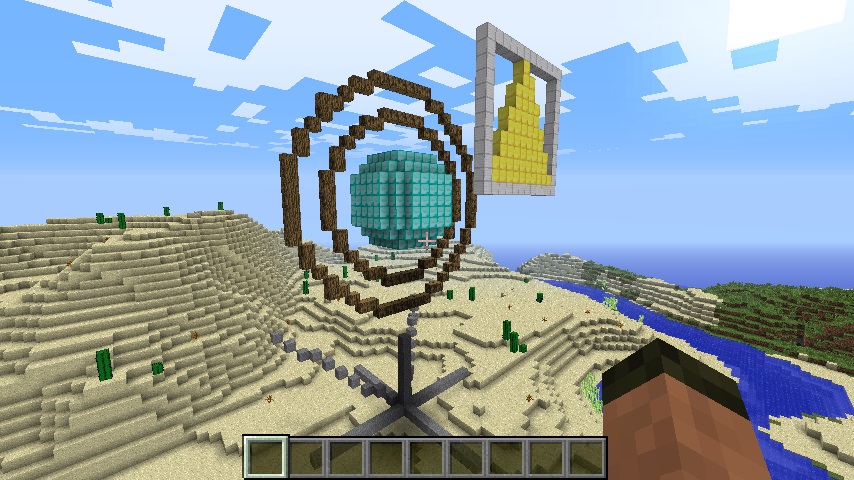 Over the past 10 months or so, I have created quite a few minecraft projects and in doing so I have also created quite a few functions which I thought other people might find useful. To make it easier to use these functions, I thought I would create an extension module for the Minecraft: Pi edition api. I couldn’t think of a good name for it, so its just minecraftstuff.
The first class I have included in minecraftstuff is MinecraftDrawing which allows you to easily create 2d and 3d lines and shapes in minecraft. I will add other ‘stuff’ to the extension over time.
Note - The MinecraftDrawing code is now part of the minecraft-stuff module, see minecraft-stuff.readthedocs.io for documentation and install instructions.
To use the minecraftstuff extension you just need to put the minecraftstuff.py python module in the same directory that the minecraft api is in. If you are using my programs or tutorials I tend to put the api in a directory called minecraft in the programs directory, so ~/my-minecraft-program/minecraft, but it doesn’t matter you just need to put the minecraftstuff.py file in the same directory as the minecraft.py, block.py, connection.py, etc files.
You can download the extension directly to your raspberry pi from my github, so change directory to where your minecraft api is stored and use wget https://raw.github.com/martinohanlon/minecraft-stuff/master/minecraftstuff.py to download it:
cd my-minecraft-program/minecraft

wget https://raw.github.com/martinohanlon/minecraft-stuff/master/minecraftstuff.py
Once you have download the extension, its pretty easy to use:
You need to import the minecraftstuff module to your code:
#import minecraftstuff.py module
import minecraft.minecraftstuff as minecraftstuff
Once you have connected to minecraft you can create the MinecraftDrawing object by passing in the minecraft connection:
#connect to minecraft
mc = minecraft.Minecraft.create()
#create minecraft drawing object and pass in the minecraft connection
mcdrawing = minecraftstuff.MinecraftDrawing(mc)
The minecraft drawing class supports the following functions:
- drawLine
- drawSphere
- drawCircle
- drawFace
#call drawLine passing in 2 sets of x,y,z co-ordinates for the start and end of the line and a block type
mcdrawing.drawLine(x1,y1,z1,x2,y2,z2,blockType,blockData)

#call drawSphere passing in the co-ordinate of the centre of the sphere, a radius and a block type
mcdrawing.drawSphere(x,y,z,radius,blockType,blockData)
#call drawCircle passing in the co-ordinate of the centre of the circle, a radius and a block type
mcdrawing.drawCircle(x,y,z,radius,blockType,blockData)
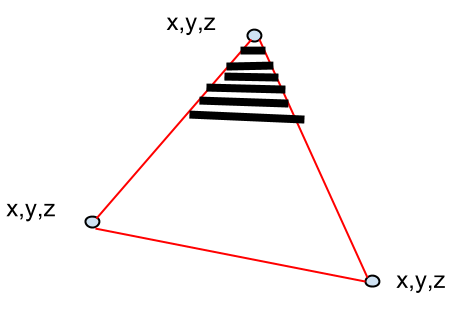
#call drawFace to create any flat shape
# by passing in a number of points which it then joins together # if passed True it fills in the gaps with the blockType passed
# passing False draws a wire-frame of the shape
# some points
shapePoints = []
shapePoints.append(minecraft.Vec3(x1,y1,z1))
shapePoints.append(minecraft.Vec3(x2,y2,z2))
shapePoints.append(minecraft.Vec3(x3,y3,z3))
# draw the points together and True fills it in
mcdrawing.drawFace(shapePoints, True, block.GOLD_BLOCK.id)
The code for the demo in the video is below, which may also help you in using MinecraftDrawing:
#www.stuffaboutcode.com
#Minecraft Stuff Extensions Demo

#import the minecraft.py module
import minecraft.minecraft as minecraft
#import block.py module
import minecraft.block as block
#import minecraftstuff.py module
import minecraft.minecraftstuff as minecraftstuff
#import time
import time

#connect to minecraft
mc = minecraft.Minecraft.create()

#get players position
playerPos = mc.player.getTilePos()

#create minecraft drawing object
mcdrawing = minecraftstuff.MinecraftDrawing(mc)

# Draw some lines
mc.postToChat("Draw lines")
time.sleep(5)
# pass 2 sets of co-ordinates and a block
#  - the start of the line and the end of the line
mcdrawing.drawLine(playerPos.x, playerPos.y + 2, playerPos.z,
                   playerPos.x + 10, playerPos.y + 2, playerPos.z,
                   block.STONE)
time.sleep(1)
mcdrawing.drawLine(playerPos.x, playerPos.y + 2, playerPos.z,
                   playerPos.x, playerPos.y + 2, playerPos.z + 10,
                   block.STONE)
time.sleep(1)
mcdrawing.drawLine(playerPos.x, playerPos.y + 2, playerPos.z,
                   playerPos.x - 10, playerPos.y + 2, playerPos.z,
                   block.STONE)
time.sleep(1)
mcdrawing.drawLine(playerPos.x, playerPos.y + 2, playerPos.z,
                   playerPos.x, playerPos.y + 2, playerPos.z - 10,
                   block.STONE)
time.sleep(1)
mcdrawing.drawLine(playerPos.x, playerPos.y + 2, playerPos.z,
                   playerPos.x, playerPos.y + 10, playerPos.z,
                   block.STONE)
time.sleep(1)
mcdrawing.drawLine(playerPos.x, playerPos.y + 2, playerPos.z,
                   playerPos.x + 10, playerPos.y + 10, playerPos.z - 10,
                   block.STONE)
time.sleep(1)
mcdrawing.drawLine(playerPos.x, playerPos.y + 2, playerPos.z,
                   playerPos.x - 10, playerPos.y + 10, playerPos.z - 10,
                   block.STONE)
time.sleep(5)

# Draw a sphere
mc.postToChat("Draw a sphere")
time.sleep(2)
#pass the middle coordinate and a radius
mcdrawing.drawSphere(playerPos.x, playerPos.y + 25, playerPos.z, 5, block.DIAMOND_BLOCK.id)
time.sleep(5)

# Draw some circles
mc.postToChat("Draw some circles")
time.sleep(2)
#pass the middle coordinate and a radius
mcdrawing.drawCircle(playerPos.x, playerPos.y + 25, playerPos.z, 8,block.WOOD.id)
time.sleep(1)
mcdrawing.drawCircle(playerPos.x, playerPos.y + 25, playerPos.z, 11,block.WOOD.id)
time.sleep(5)

# Draw some shapes
#  - by passing a list of points, which then get joined together
mc.postToChat("Draw some shapes")
time.sleep(2)
# some points
shapePoints = []
shapePoints.append(minecraft.Vec3(playerPos.x + 1, playerPos.y + 27, playerPos.z + 10))
shapePoints.append(minecraft.Vec3(playerPos.x + 5, playerPos.y + 36 , playerPos.z + 10))
shapePoints.append(minecraft.Vec3(playerPos.x + 10, playerPos.y + 26, playerPos.z + 10))
# draw the points together and True fills it in
mcdrawing.drawFace(shapePoints, True, block.GOLD_BLOCK.id)

time.sleep(2)
#some points
shapePoints = []
shapePoints.append(minecraft.Vec3(playerPos.x, playerPos.y + 26, playerPos.z + 10))
shapePoints.append(minecraft.Vec3(playerPos.x + 11, playerPos.y + 26 , playerPos.z + 10))
shapePoints.append(minecraft.Vec3(playerPos.x + 11, playerPos.y + 37, playerPos.z + 10))
shapePoints.append(minecraft.Vec3(playerPos.x + 0, playerPos.y + 37, playerPos.z + 10))
# draw the points together and False, DONT fill it in
mcdrawing.drawFace(shapePoints, False, block.IRON_BLOCK.id)

# www.stuffaboutcode.com
The code for minecraftstuff is on github at https://github.com/martinohanlon/minecraft-stuff.