Raspberry Pi - Python & Temp Sensor DS18B20
I got a DS18B20 temperature sensor a little while back and I wanted to get it connected to a Raspberry Pi, so I could temperature in some of my data logging projects. There are a couple of really good tutorials which describe how to get the sensor up and running (Cambridge University, Adafruit), but the code examples they provided didn’t really fit my needs.
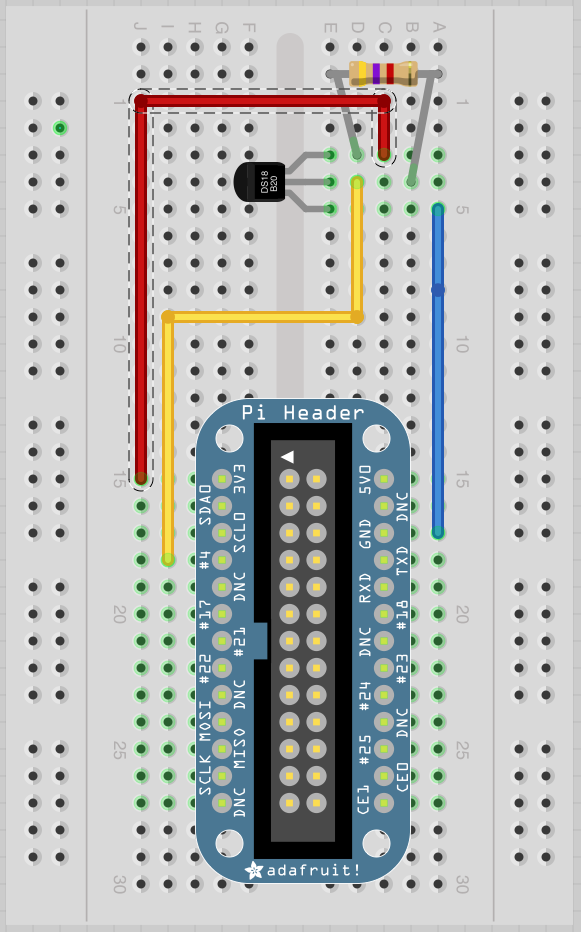
Setting up the sensor The DS18B20 is a 1-wire digital sensor and is very easy to setup. It has 3 pins, 3.3v in, data & ground and you will also need a 4.7K-10K resistor ‘pull-up’ the data line.
Looking at the sensor with the flat side facing you:
- Pin 1 -> Raspberry Pi GND
- Pin 2 -> Raspberry Pi GPIO 4
- Pin 3 -> Raspberry Pi 3V
- 4.7K resistor goes between Pin 2 & 3
Setup the software In order to read data from the sensor I needed to install some modules using modprobe. Once I had I could read the data from the sensor (including the current temperature) just like reading a file.
Install modules:
sudo modprobe w1-gpio
sudo modprobe w1-therm
The sensor appeared as a directory in /sys/bus/w1/devices directory. The name of the directory is 28-########## with the hashes being the Id of the sensor:
cd /sys/bus/w1/devices
ls
cd 28-***********  (whatever the Id of your sensor)
I could then read the temperature data from the w1_slave file:
cat w1_slave
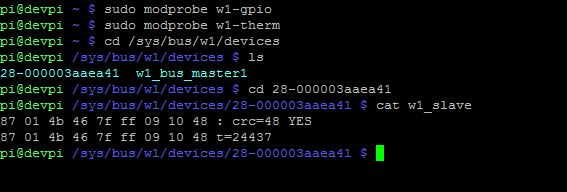
The data from the sensor looks like this:
f6 01 4b 46 7f ff 0a 10 eb : crc=eb YES
f6 01 4b 46 7f ff 0a 10 eb t=24437
The first line tells us whether the data read was successful with YES. The second line displays the temperature as t=#####.
The temperature is returned in 1000’s of a degress so 24437 is 24.437 centigrade.
Python program I created a python module which would periodically sample the temperature from the sensor and allow a calling program to read the temperature from module as and when required, similar to the module I wrote for reading GPS data.
There is a more complete example of how to use the module in the code below but simply you use it like this:
#create temp sensor controller, passing Id of sensor and a time to wait between reads
tempcontrol = TempSensorController("28-000003aaea41", 1)

#start up temp sensor controller
tempcontrol.start()

#read temperature
print tempcontrol.temperature.C
print tempcontrol.temperature.F

#stop the controller
tempcontrol.stopController()
Temperature Sensor Controller code
import threading
import time

DEVICESDIR = "/sys/bus/w1/devices/"

#class for holding temperature values
class Temperature():
    def __init__(self, rawData):
        self.rawData = rawData
    @property
    def C(self):
        return float(self.rawData) / 1000
    @property
    def F(self):
        return self.C * 9.0 / 5.0 + 32.0

#class for controlling the temperature sensor
class TempSensorController(threading.Thread):
    def __init__(self, sensorId, timeToSleep):
        threading.Thread.__init__(self)

        #persist the file location
        self.tempSensorFile = DEVICESDIR + sensorId + "/w1_slave"

        #persist properties
        self.sensorId = sensorId
        self.timeToSleep = timeToSleep

        #update the temperature
        self.updateTemp()

        #set to not running
        self.running = False

    def run(self):
        #loop until its set to stopped
        self.running = True
        while(self.running):
            #update temperature
            self.updateTemp()
            #sleep
            time.sleep(self.timeToSleep)
        self.running = False

    def stopController(self):
        self.running = False

    def readFile(self):
        sensorFile = open(self.tempSensorFile, "r")
        lines = sensorFile.readlines()
        sensorFile.close()
        return lines

    def updateTemp(self):
        data = self.readFile()
        #the output from the tempsensor looks like this
        #f6 01 4b 46 7f ff 0a 10 eb : crc=eb YES
        #f6 01 4b 46 7f ff 0a 10 eb t=31375
        #has a YES been returned?
        if data[0].strip()[-3:] == "YES":
            #can I find a temperature (t=)
            equals_pos = data[1].find("t=")
            if equals_pos != -1:
                tempData = data[1][equals_pos+2:]
                #update temperature
                self.temperature = Temperature(tempData)
                #update success status
                self.updateSuccess = True
            else:
                self.updateSuccess = False
        else:
            self.updateSuccess = False

if __name__ == "__main__":

    #create temp sensor controller, put your controller Id here
    # look in "/sys/bus/w1/devices/" after running
    #  sudo modprobe w1-gpio
    #  sudo modprobe w1-therm
    tempcontrol = TempSensorController("28-000003aaea41", 1)

    try:
        print("Starting temp sensor controller")
        #start up temp sensor controller
        tempcontrol.start()
        #loop forever, wait for Ctrl C
        while(True):
            print tempcontrol.temperature.C
            print tempcontrol.temperature.F
            time.sleep(5)
    #Ctrl C
    except KeyboardInterrupt:
        print "Cancelled"

    #Error
    except:
        print "Unexpected error:", sys.exc_info()[0]
        raise

    #if it finishes or Ctrl C, shut it down
    finally:
        print "Stopping temp sensor controller"
        #stop the controller
        tempcontrol.stopController()
        #wait for the tread to finish if it hasn't already
        tempcontrol.join()

    print "Done"