Minecraft RaspberryJuice and Canarymod
Believe it or not Bukkit is not the only Minecraft server that supports plugins!
I have been maintaining a Bukkit plugin called RaspberryJuice for a little while, which allows you to run the same programs you developed for Minecraft on the Raspberry Pi on the full version of Minecraft.
So to give people a choice and to ensure the longevity of the RaspberryJuice plugin I have migrated it to Canarymod. Canarymod is another Minecraft server, with an open source API which allows you to interface directly with the server. This is what RaspberryJuice does, it listens for the command which would normally be sent to the Pi edition of Minecraft and makes the same things happen in Minecraft.
You can get the RaspberryJuice source code plugin for Canarymod from https://github.com/martinohanlon/canaryraspberryjuice.
None of this could have been possible without the work of zhuowei who originally create the RaspberryJuice Bukkit plugin.
I will keep them both versions of the RaspberryJuice plugin’s up to date for as long as its viable.
If you want to create your own Canarymod server with RaspberryJuice plugin follow these steps:
Download and install Canarymod
- Create a folder for Canarymod, anywhere it doesn’t matter
- Head over to http://canarymod.net/releases and download the latest version of Canarymod and save the .jar file to the folder.
- Rename the downloaded .jar file from canarymod-#.#.#-#.#.#.jar to canarymod.jar
- Open Notepad, insert the following text:
java -jar CanaryMod.jar
pause
- Save the file in the folder as start.bat
Run CanaryMod
Double click start.bat
You will be asked to confirm you accept the EULA. Open the eula.txt file and change eula=false to eula=true and save the file.
Double click start.bat to run the CanaryMod again.
Test Canarymod
The version of Minecraft you use needs to match the version of Canarymod you downloaded. So if you downloaded Canarymod 1.7.10 you need to set Minecraft to use 1.7.10 as well. You can do this by picking the correct version from the “Edit Profile” window on the Minecraft Launcher.
Open Minecraft, Multiplayer, Direct Connect, Type “localhost”, Join Server
You can stop Canarymod by typing
stop
in the canarymod command window
Download and Install Raspberry Juice
- Download raspberry juice source code and plugin from https://github.com/martinohanlon/CanaryRaspberryJuice/archive/master.zip
- Open the zip file and copy the latest version of the plugin CanaryRaspberryJuice-#.#.jar from the jars folder to the plugins folder in the Canarymod folder
- Start up Canarymod
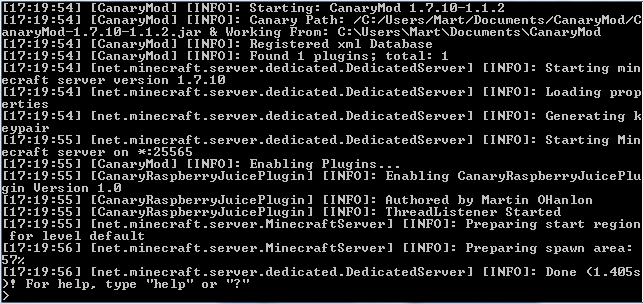
If everything has gone to plan you should see a message when you start up Canarymod that RaspberryJuice has been enabled.
You can now run your Minecraft: Pi Edition programs on the full version of Minecraft. Here is a video of the Minecraft Analogue Clock running on Bukkit using Raspberry Juice.